Local playground for testing and development
- Environment prerequisites
- Running project locally
- Verify installation
- Run integration tests
- Cleaning
- AI inference resilience demo
- Sample demo
- Multi-Service Ingress
- Round Robin
- Failover
NOTE
This tutorial relies on some makefile targets, to be able to fully understand what's happening under the covers, check the Makefile
source code.
Or you may want to run a target first with -n switch that will print what it is going to do (example: make -n test-round-robin).
For more user-centric targets in that makefile consult make help.
Environment prerequisites
-
Install Go — use the version pinned in
go.mod(currently1.27.1; CI usesgo-version-file: ./go.mod) -
Ensure you are able to push/pull from your docker registry
To run multiple clusters, reserve 8GB of memory
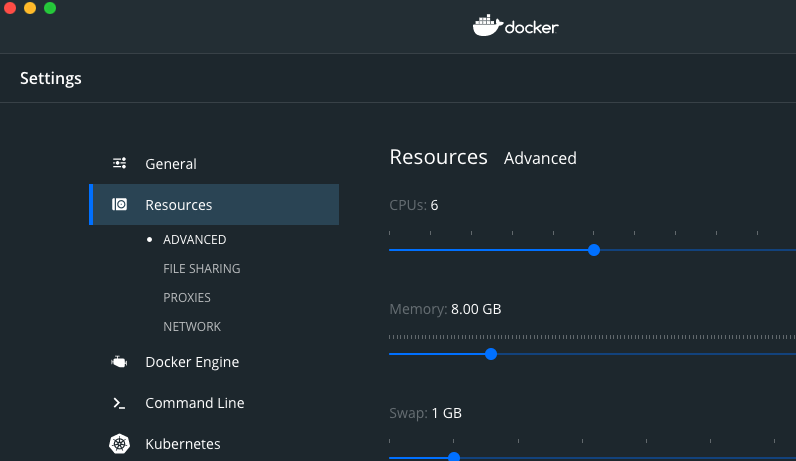 above screenshot is provided for Docker for Mac, options for other Docker distributions may vary
-
install kubectl to operate k8s clusters
-
install helm3 to deploy k8gb and related test workloads
-
install k3d to run local k3s clusters (minimum v5.3.0 version is required)
-
install golangci-lint for code quality checks
Running project locally
To spin-up a local environment using two k3s clusters and deploy a test application to both clusters, execute the command below:
By default, local setup also applies a small set of legacy k8gb.absa.oss/v1beta1 migration demo resources on each local test cluster. The examples reuse workloads from the standard setup and cover referenced Ingresses, embedded Ingress migration, and annotation-sensitive LoadBalancer Service reconciliation. The setup prints legacy/canonical manifests so you can see migration output immediately.
The Service examples share one LoadBalancer Service backed by the existing multiservice-blue pods:
legacy-service-runtime-demoremains in legacy runtime mode.legacy-service-migration-demois migrated tok8gb.io/v1beta1.
Verify that both paths retain k8gb.io/hostname and reconcile a DNSEndpoint:
kubectl get gslb.k8gb.absa.oss -n test-gslb legacy-service-runtime-demo \
  -o jsonpath='{.metadata.annotations.k8gb\.io/hostname}{" / "}{.status.hosts}{"\n"}'
kubectl get dnsendpoint -n test-gslb legacy-service-runtime-demo

kubectl get gslb.k8gb.io -n test-gslb legacy-service-migration-demo \
  -o jsonpath='{.metadata.annotations.k8gb\.io/hostname}{" / "}{.status.hosts}{"\n"}'
kubectl get dnsendpoint -n test-gslb legacy-service-migration-demo
If you want to skip this demo output:
Verify installation
If local setup runs well, check if clusters are correctly installed
kubectl cluster-info --context k3d-edgedns && kubectl cluster-info --context k3d-test-gslb1 && kubectl cluster-info --context k3d-test-gslb2
Cluster test-gslb1 is exposing external DNS on default port :5053
while test-gslb2 on port :5054.
Cluster edgedns runs BIND and acts as EdgeDNS holding Delegated Zone for out test setup and answers
on port :1053.
You can verify that correct IP addresses of all the nodes in both clusters were populated:
for c in k3d-test-gslb{1,2}; do kubectl get no -ocustom-columns="NAME:.metadata.name,IP:status.addresses[0].address" --context $c; done
Returns a result similar to:
NAME                      IP
k3d-test-gslb1-agent-0    172.20.0.2
k3d-test-gslb1-server-0   172.20.0.4
NAME                      IP
k3d-test-gslb2-server-0   172.20.0.6
k3d-test-gslb2-agent-0    172.20.0.5
Or you can ask specific CoreDNS instance for its local targets:
dig -p 5053 @localhost localtargets-roundrobin.cloud.example.com && \
dig -p 5054 @localhost localtargets-roundrobin.cloud.example.com
...
...
;; ANSWER SECTION:
localtargets-roundrobin.cloud.example.com. 30 IN A 172.20.0.4
localtargets-roundrobin.cloud.example.com. 30 IN A 172.20.0.2
...
...
localtargets-roundrobin.cloud.example.com. 30 IN A 172.20.0.5
localtargets-roundrobin.cloud.example.com. 30 IN A 172.20.0.6
curl localhost:80 -H "Host:roundrobin.cloud.example.com" && curl localhost:81 -H "Host:roundrobin.cloud.example.com"
The local setup also deploys small multi-service Ingresses backed by two NGINX services and canonical k8gb.io/v1beta1 GSLBs using both service health policies.
curl localhost:80/blue -H "Host:multiservice-all.cloud.example.com"
curl localhost:80/green -H "Host:multiservice-any.cloud.example.com"
kubectl --context k3d-test-gslb1 -n test-gslb get gslb \
  multiservice-gslb-all multiservice-gslb-any \
  -o custom-columns=NAME:.metadata.name,POLICY:.spec.serviceHealthPolicy,HEALTH:.status.serviceHealth
Run integration tests
There is wide range of scenarios which GSLB provides and all of them are covered within tests. To check whether everything is running properly execute terratest :
Cleaning
Clean up your local development clusters with
AI inference resilience demo
The local setup can also deploy a lightweight Ollama inference endpoint to demonstrate k8gb failover for AI traffic:
If the local setup is already running:
make ai-inference-demo AI_DEMO_ACTION=deploy
make ai-inference-demo AI_DEMO_ACTION=probe
make ai-inference-demo AI_DEMO_ACTION=failover
make ai-inference-demo AI_DEMO_ACTION=probe
make ai-inference-demo AI_DEMO_ACTION=failback
The demo caches the downloaded model in a PVC, so failback does not re-download the model. If model startup is slow, inspect progress with:
See AI Inference Resilience Demo for the full local and real-environment flow.
Sample demo
Multi-Service Ingress
multiservice-all.cloud.example.com and multiservice-any.cloud.example.com both route /blue and /green to separate Services. The All GSLB requires both Services to be healthy, while the Any GSLB remains healthy as long as at least one backing Service is healthy.
kubectl --context k3d-test-gslb1 -n test-gslb scale deploy multiservice-green --replicas=0
kubectl --context k3d-test-gslb1 -n test-gslb get gslb \
  multiservice-gslb-all multiservice-gslb-any \
  -o custom-columns=NAME:.metadata.name,POLICY:.spec.serviceHealthPolicy,HEALTH:.status.serviceHealth
kubectl --context k3d-test-gslb1 -n test-gslb scale deploy multiservice-green --replicas=1
Round Robin
Both clusters have podinfo installed on the top, where each
cluster has been tagged to serve a different region. In this demo we will hit podinfo by wget -qO - roundrobin.cloud.example.com and depending
on the region, podinfo will return us or eu. In the current round robin implementation IP addresses are randomly picked.
See Gslb manifest with round robin strategy
Try to run the following command several times and watch the message field.
Failover
Both clusters have podinfo installed on the top where each
cluster has been tagged to serve a different region. In this demo we will hit podinfo by wget -qO - failover.cloud.example.com and depending
on whether podinfo is running inside the cluster it returns only eu or us.
See Gslb manifest with failover strategy
Switch GSLB to failover mode:
Now both clusters are running in failover mode and podinfo is running on both of them. Run several times command below and watchmessage field.
You will see only eu podinfo is responsive:
Stop podinfo on current (eu) cluster:
Several times hit application again
As expected result you should see only podinfo from second cluster (us) is responding:
It might happen that podinfo will be unavailable for a while due to
DNS sync interval and default k8gb DNS TTL of 30 seconds
Start podinfo again on current (eu) cluster:
and hit several times hit podinfo:
After DNS sync interval is over eu will be back
Optionally you can switch GSLB back to round-robin mode